The player could not load. Watch it on YouTube instead.
TickPlay on Apple Watch: offline music, FLAC, LRC lyrics and Wi-Fi transfer
Apple Watch 独立播放音乐?TickPlay:离线听歌、FLAC 无损音质、LRC 同步歌词、本地 WiFi 传歌、后台播放
About this video
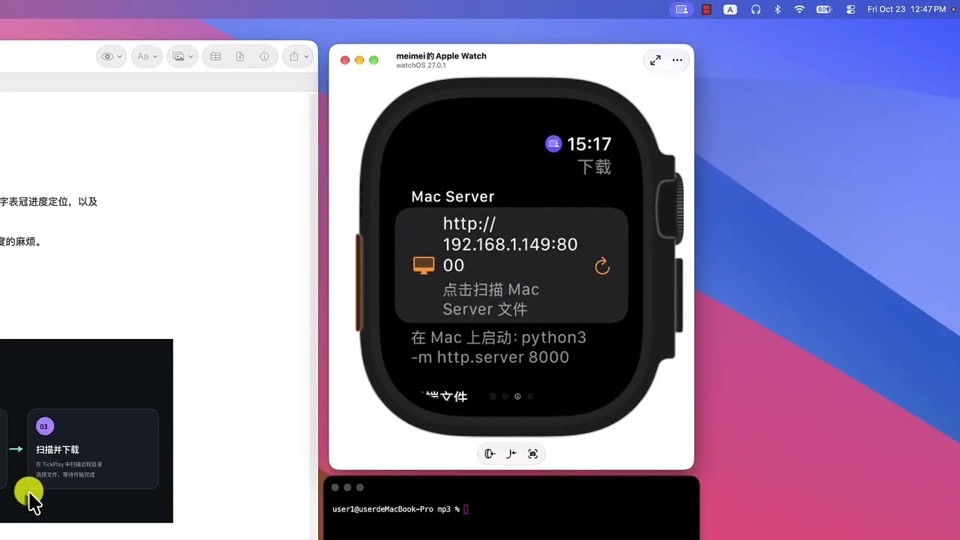
An eight-minute demonstration of TickPlay, an independent music player for Apple Watch. The useful part is the transfer: the video shows the watch running a local HTTP server, the phone or Mac opening it in a browser, and files landing on the watch over the same Wi-Fi network — no account, no cloud library. It then plays the transferred files back with the phone switched off, which is the claim the app actually rests on.
The demonstration is worth watching for one section in particular: from 4:32 the watch starts an HTTP server and the other device scans for it, which is how files get across without an account or a cloud library. That is the part a product page describes in a sentence and a video can actually show, including what the transfer looks like when it is slow.
Everything else is feature coverage in the order the description lists it: formats (FLAC, MP3, M4A, AAC, WAV and whatever the built-in decoder handles), LRC lyrics that follow playback, background audio, and Digital Crown scrubbing. The offline test at 5:33 is the one that matters for the app’s premise — files already on the watch, playing with nothing else connected.
The page for TickPlay carries the platform floor and the licence terms; this video does not discuss either, and nothing here should be read as a statement about them.
What it covers
- How music reaches the watch over local Wi-Fi: an HTTP server on the watch, a browser on the other device
- Which formats the app plays — FLAC, MP3, M4A, AAC and WAV among them
- How an LRC file is displayed in step with playback
- That playback continues in the background, so leaving the player screen does not stop the music
- That the same app plays compatible video files stored on the watch
Chapters
Times are the creator's own chapter list, published with the video, so they are exact rather than estimated.